
Create 1-Day SMS Events
This has to be set up by Global Administrator (REANNZ).
-
Agree with member organisation on what their *daily keyword* will be (used as the base for constructing the 1-day SMS codes). It has to be unique across organisations, we cannot use something already used by another member.
-
Create a "token" that will be used to authenticate to the URL serving the daily codes.
-
This request will come from the member and REANNZ would do the two steps above.
-
A URL will be provided to the member for their display screen.
-
An optional step would be securing the URL to be accessible only from whitelisted IP addresses if agreed to with the member.
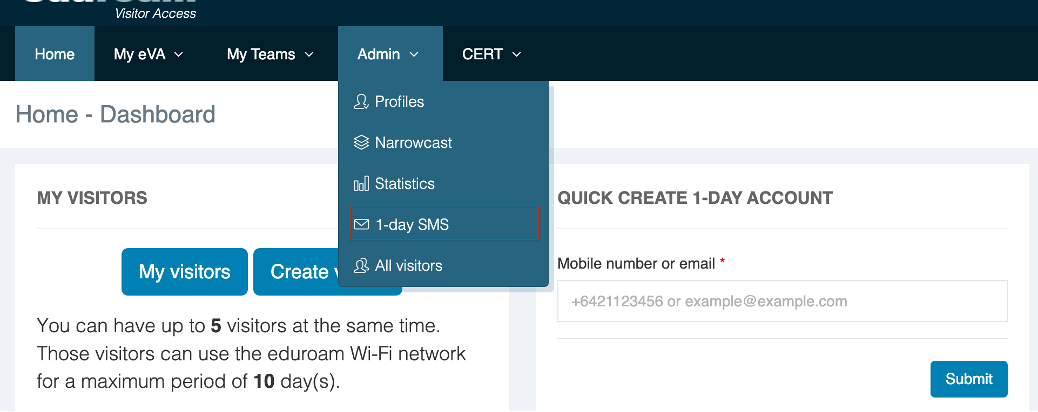
These 1-day SMS keywords are viewable and modifiable in the menu option Admin>1-day SMS.
Navigate to Admin> 1-day SMS
Here’s a sample list of generated keywords and succeeding keywords preconfigured based on the validity set by the user.
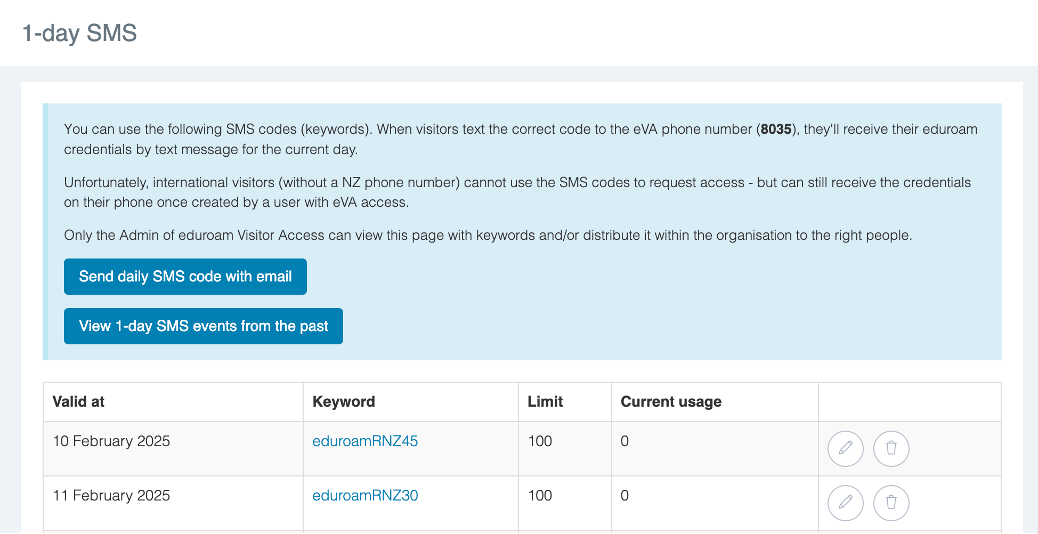
You have the following options:
-
Click on pencil icon to change the details of a 1-day SMS keyword. You can only change the maximum number of visitors that can access eduroam simultaneously using this keyword (the keyword itself cannot be changed).
-
Click on bin icon to delete a 1-day SMS keyword.
-
Click on the daily keyword to view the SMS narrowcast/poster for that date